Cliora

Private, On-Device Sales Notebook

Remember who to follow up with.
Log what happened.

Cliora replaces the paper logbook and the overweight CRM with one tool built for a single job — in seconds, on the spot. No account, no cloud. Every feature is free; the one-time Remove Ads purchase unlocks full offline use.

No account No cloud Every feature free One-time purchase removes ads

How it works

The whole app is four screens

01

Today

Your day, not a dashboard

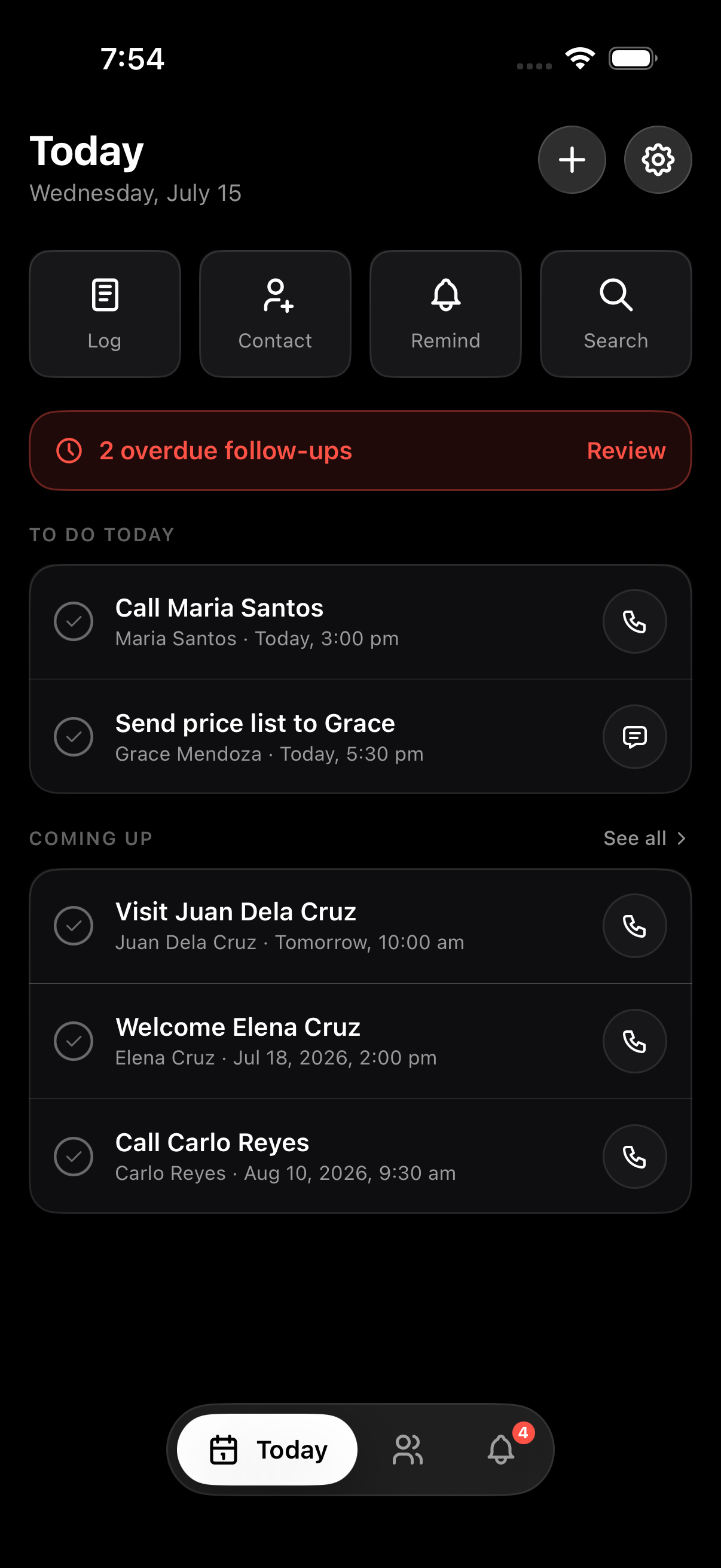
Open Cliora and land straight on Today — quick actions for logging a visit, adding a contact, setting a reminder, or searching, with anything overdue flagged right at the top so it never slides out of view.

  • Log, Contact, Remind, Search — one tap from the home screen
  • Overdue follow-ups surfaced above everything else
  • To Do Today and Coming Up, sorted by when they're due
Today screen
02

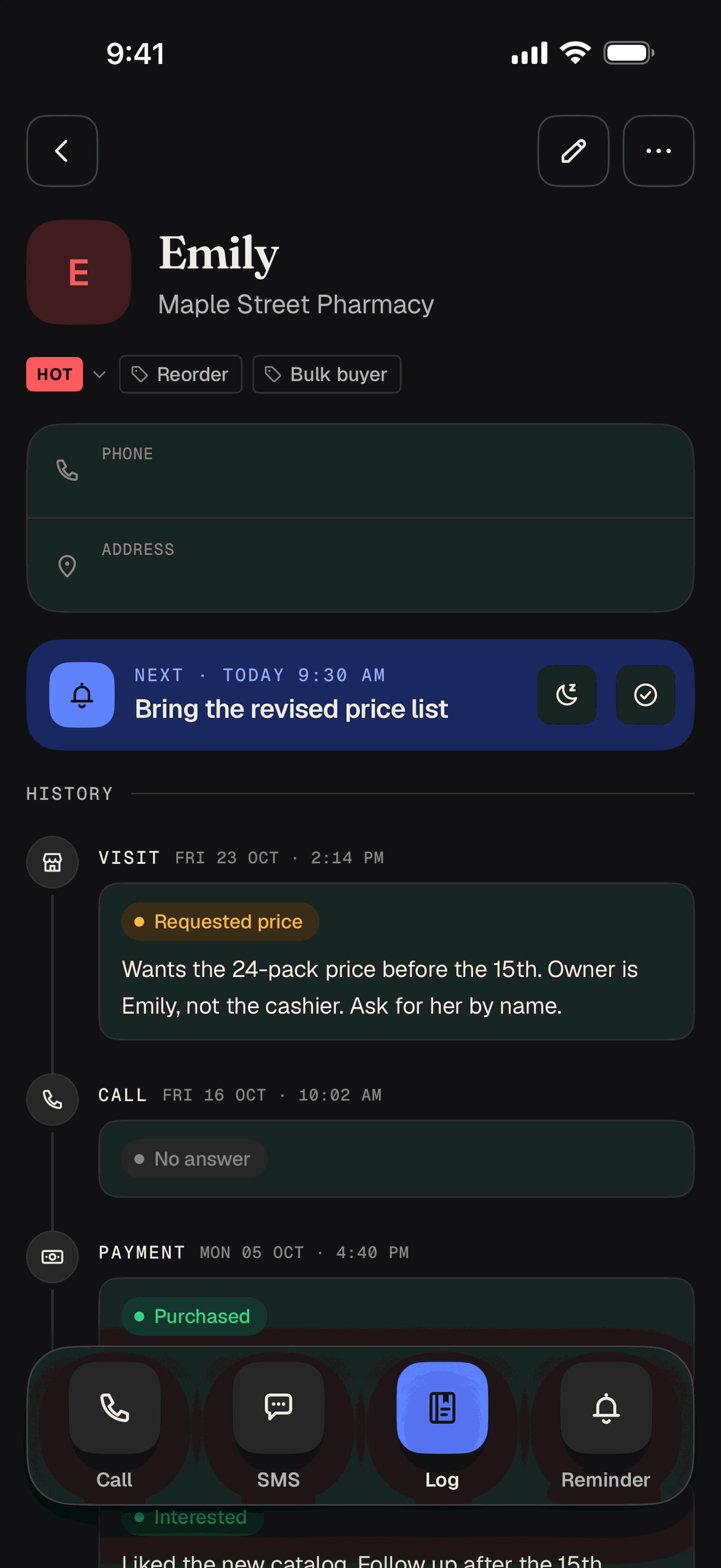
Contacts

Six statuses keep it honest

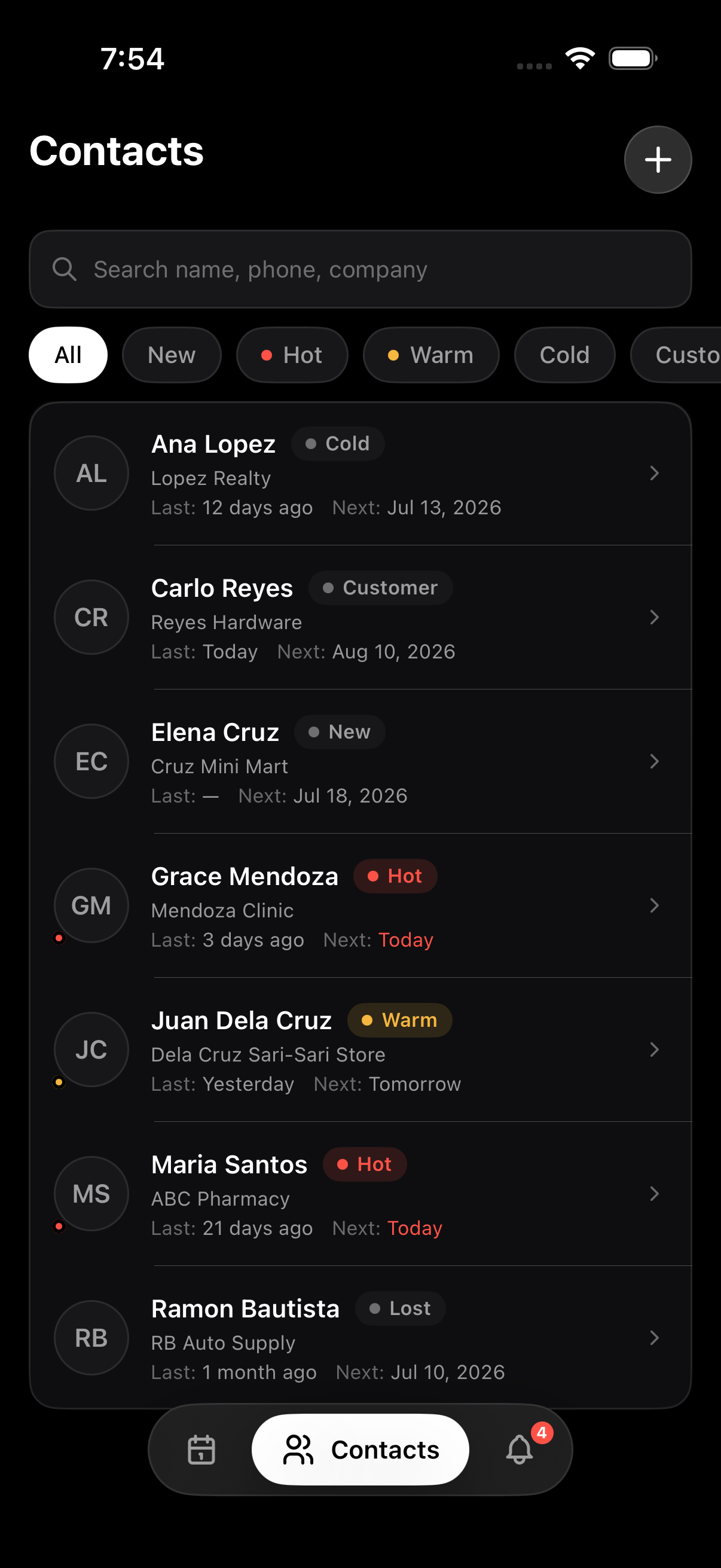
Every contact carries one status — New, Hot, Warm, Cold, Customer, or Lost — plus at-a-glance Last and Next dates, so you always know when you last spoke and when to reach out again.

  • Filter the list by status, or search name, phone, or company
  • Only Hot and Warm carry colour — the rest stay neutral on purpose
  • Last contacted and next follow-up shown on every row
Contacts screen
03

Reminders

Today · Overdue · Upcoming · Done

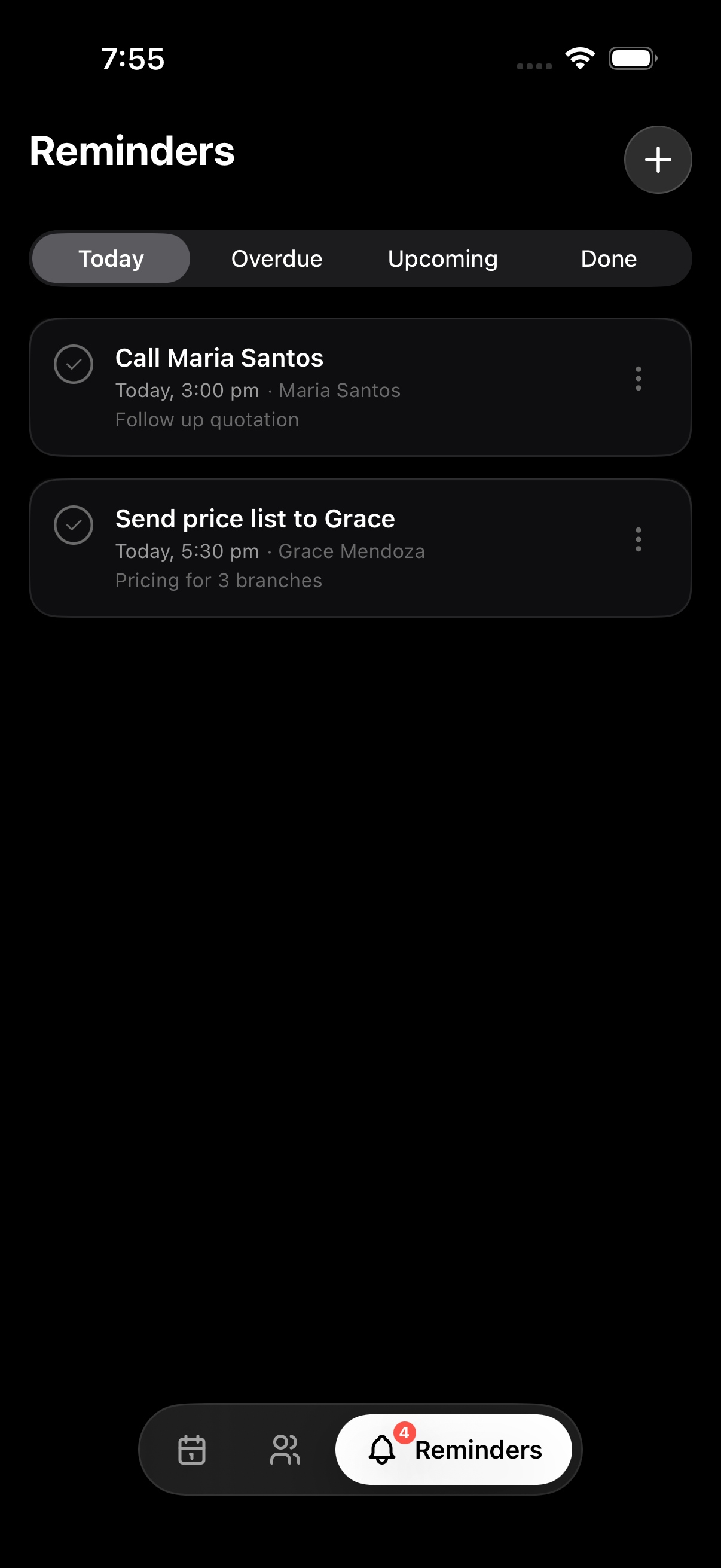
Every reminder is tied to a contact and fires as a local notification — no push server involved. Turn on a Daily Digest for one morning summary, or set Quiet Hours so nothing pings you off the clock.

  • Grouped into Today, Overdue, Upcoming, and Done
  • Optional once-a-day Daily Digest, at a time you pick
  • Quiet Hours mutes alerts outside working hours
Reminders screen
04

Settings

Yours, backed up, on your terms

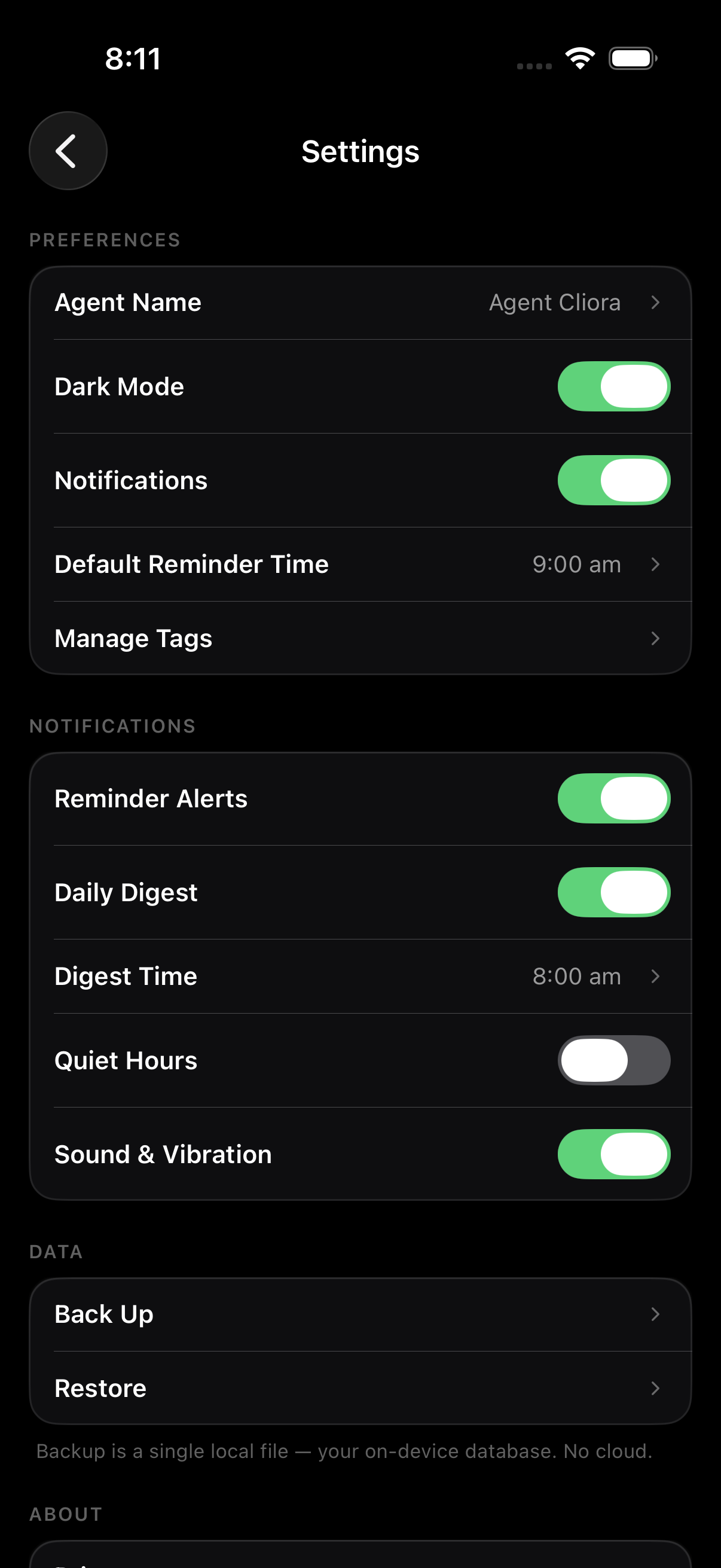
Set your agent name, default reminder time, and notification preferences, then back up your entire on-device database to a single file whenever you want a copy outside your phone.

  • Agent name, dark mode, default reminder time, and tag management
  • Back Up and Restore — a single local file, no cloud involved
  • One-time Remove Ads purchase also unlocks full offline launch
Settings screen

Built for the field

A sales memory aid, not another CRM

A handful of things, done fast — so it stays out of your way on a busy sales day.

Glanceable first

Open the app and see today's follow-ups instantly — no dashboards, no charts, just what to do next.

Log in seconds

Capture a call, visit, or meeting with big tap targets and an autofocused notes field. Under 15 seconds.

Per-contact history

Every interaction lives on the contact as a timeline, so you always have context before a call.

Works fully offline

After the one-time Remove Ads purchase, Cliora opens and runs with no connection at all.

Private by design

No cloud, no account, no sync server. Your client list never leaves your phone.

Genuinely native

Apple HIG on iOS, Material 3 on Android — each app feels at home, not like a cross-platform clone.

Monochrome with meaning

Colour is reserved for what matters

The interface stays calm black, white, and grey. Colour appears only on status — so red and amber always mean something. Six keep your pipeline glanceable.

New Just added — not worked yet.
Hot Needs a call now. The only red on screen.
Warm Moving along — keep it warm.
Cold Gone quiet. Low priority for now.
Customer Closed — now a paying client.
Lost No longer pursuing this one.

Private by design

No cloud. No account.
No server to breach.

Cliora is private by design. Nothing is uploaded, there is no account to create, and there is no server that could leak your client list — because there is no server at all.

No cloud No account No sync No tracking Backup & Restore to a local file

Pricing

Every feature is free. Removing ads is optional.

There is no feature gate. The single one-time purchase only removes the launch ad and unlocks full offline launch — nothing else is held back.

Free

Every feature, no limits

  • Unlimited contacts, logs & reminders
  • Local notifications, Daily Digest & Quiet Hours
  • Backup & Restore to a single local file
  • Everything stored on your device

Remove ads

One-time purchase, restore anytime

  • No launch ad, ever
  • Full offline launch — opens with no connection
  • Pay once, restore on any signed-in device
  • Every free feature, unchanged

One-time purchase. No subscription. Restore anytime via Settings → Restore purchase.

FAQ

Common questions

Do I need an account to use Cliora?

No. There are no accounts and no sign-up. You open the app and start adding contacts — everything stays on your device.

Where is my data stored?

Entirely on your phone (Core Data on iOS, Room on Android). There is no cloud, no sync server, and nothing is uploaded.

What does the one-time "Remove Ads" purchase do?

It removes the launch ad and unlocks full offline use, so the app opens with no connection at all. It's a single one-time purchase (your store sets the regional price) — never a subscription.

Why do free users need to be online when opening the app?

Free use is supported by a single App Open ad that loads on launch. Once you remove ads, that requirement disappears and Cliora runs completely offline.

Is there a web or desktop version?

Not in v1. Cliora is deliberately a focused, native iOS and Android app — Apple HIG on iOS, Material 3 on Android. This site is just the marketing page.

Can I move my data to a new phone?

Yes — Backup & Restore exports a single local file containing your on-device database, which you can restore on another device. No CSV, no cloud round-trip.

Cliora

Start remembering today

Free to install, every feature included. A one-time purchase removes ads and unlocks fully offline use. No account, no subscription ever.